

Files: CGFColliderSettingsTool.cs
Path: «CGF/Editor/Tools»
Menu: «Window/Chloroplast Games Framework/Collider Settings Tool»
Asset Store
Description
Tool that allows change the settings of a all colliders from a GameObject or prefab.
Reference
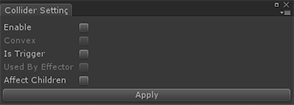
- Enable – Enable or disable the selected colliders.
- Convex – Enable or disable the Convex property. Only for MeshCollider.
- Is Trigger – Enable or disable the Is Trigger property.
- Used By Effector – Enable or disable the Used By Effector property. Only for 2D Collider.
- Affect Children – Enable or disable the properties of the colliders of the childs from the selected gameobject.
Use
Select a gameobject or prefab or multiple gameobjects and prefabs with a collider or multiple colliders of the same type to to change their collider properties.